Chore Chart Template in Excel: Layout, Formulas and a Free Printable
A chore chart template for Excel you can rebuild in 10 minutes: the exact columns, a points formula, a filled sample week, plus a free printable weekly chart.
By Famiyo Editorial Team4 min read
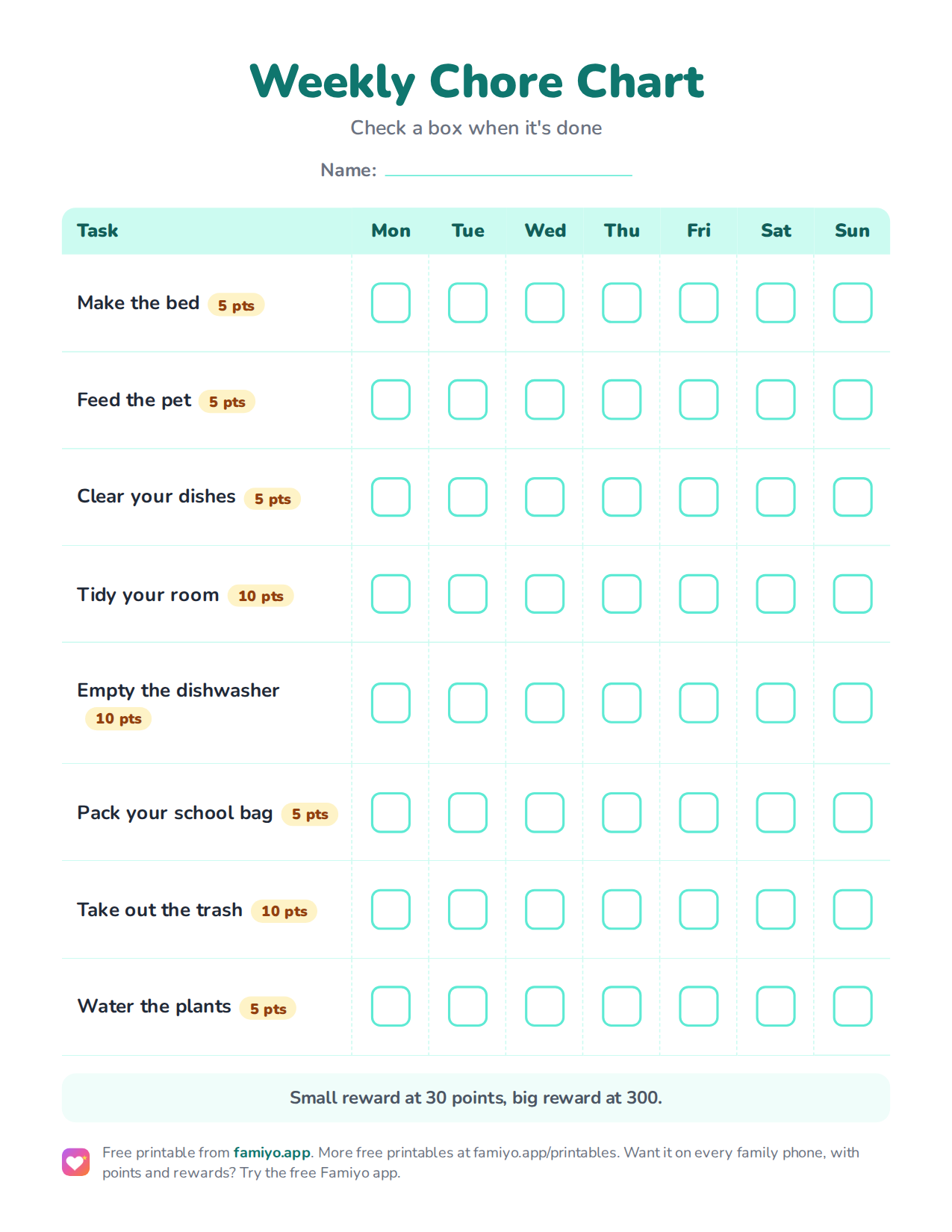
Free printable
Weekly Chore Chart
A weekly chart on one US Letter page. Download the PDF to print it, or save the image to use it on a tablet or in a document.
Free for home, classroom and nonprofit use, see the license. More free printables.
You want something simple: a grid, a week, a tick for every job done. Excel is fine for that. Below you will find the exact layout to build, the formulas that add up points for you, a sample filled week and a free printable for families who would rather skip the spreadsheet altogether.
The layout to build
Open a new blank sheet and set it up like this. It takes about 10 minutes.
| Cell | What goes in it |
|---|---|
| A1 | Child's name and the week starting date |
| A2 to A9 | One chore per row, 5 to 8 chores |
| B1 to H1 | Mon, Tue, Wed, Thu, Fri, Sat, Sun |
| I1 | Points per chore |
| J1 | Points earned this week |
| A10 | "Total" |
| J10 | Weekly total |
Make column A wide, around 28 characters, and keep the day columns narrow and equal. Bump the font to 14 so a child can read it from a few steps away. Freeze the top row if you add more chores later.
One sheet per child works better than one giant sheet for the whole family. Each child gets their own tab, named after them, and nobody has to hunt through a stranger's column for their own row.
The formulas that do the counting
You need three, and they are short.
- Points earned for one chore (cell J2):
=COUNTIF(B2:H2,"X")*I2. Copy it down to row 9. Every X in the row counts as one completion times the points in column I. - Weekly total (cell J10):
=SUM(J2:J9). - Days completed, if you want a streak figure:
=COUNTIF(B2:H9,"X")in any spare cell.
If you prefer 1s to Xs, swap the COUNTIF for =SUM(B2:H2)*I2. For a bit of satisfaction, select B2:H9, open Conditional Formatting and make any cell containing an X turn green. Kids like watching the sheet fill up.
Reset on Sunday evening by clearing B2:H9. Save the blank version as a copy first so you never have to rebuild it.
A filled sample week
Here is how a week might look for an 8-year-old. The point values follow a simple scale: 5 points for a small task, 10 for a medium one.
| Chore | Mon | Tue | Wed | Thu | Fri | Sat | Sun | Pts | Earned |
|---|---|---|---|---|---|---|---|---|---|
| Make the bed | X | X | X | X | X | X | 5 | 30 | |
| Feed the pet | X | X | X | X | X | X | X | 5 | 35 |
| Clear your dishes | X | X | X | X | X | X | 5 | 30 | |
| Tidy your room | X | X | X | X | 10 | 40 | |||
| Empty the dishwasher | X | X | X | 10 | 30 | ||||
| Take out the trash | X | X | X | 10 | 30 |
Total for the week: 195 points. A child who earns that much can afford a small reward every couple of days and a bigger one within a few weeks, if you price the rewards at 30 to 50 points for small and 300 to 500 for big. Notice the Wednesday gap: nobody gets a perfect week. A good chart expects some empty boxes.
Choosing the right chores
A template only helps if the tasks fit the child. Use the ranges below as a guide, and keep the rule of thumb in mind: 2 to 3 daily tasks for preschoolers, 3 to 4 for school-age kids, and one extra weekly job from age 8.
| Age | Good chart tasks | Time per day |
|---|---|---|
| 4-5 | Make the bed (roughly), clear their own place, feed a pet | 10 to 15 minutes |
| 6-7 | Tidy their room, pack the school bag, sweep | 15 to 20 minutes |
| 8-9 | Load the dishwasher, fold laundry, take out the trash | 20 to 30 minutes |
| 10-12 | Clean the bathroom sink, change bed sheets, cook a simple meal with an adult nearby | 30 minutes |
For a very young child, a list with pictures beats a grid of cells, and our chore cards for kids are a good next step. If you live in Google Sheets instead, the chore chart template for Google Docs and Sheets has the same layout with a few sharing tips.
The free printable
The printable below has eight common tasks with points, Monday to Sunday boxes and a one-line reward note. It suits children roughly 6 to 10. Download it, print it, and stick it to the fridge. If your child needs different tasks, edit the spreadsheet version above instead, and for a deeper look at what to include, see how to teach kids to do chores step by step.
Where a spreadsheet stops working
A spreadsheet is good at holding a grid. It is poor at nudging anyone. It lives on one computer, nobody gets a reminder, and when you are away from the house you cannot see what was done. Parents end up being the notification system, and that is exactly what most families are trying to escape.
Another limit is repetition. If a chore is every other day, or only on school days, you end up retyping. If you have two or three kids, you have three tabs to keep up with, and a week lost to a forgotten reset.
Replacing the chart with Famiyo
Famiyo is a free family app for iPhone and Android that combines a shared family calendar, chores with points and a rewards shop; kids join with a code, no email needed. In place of a grid, you add each chore once, set it to repeat daily, weekly or every few days, and give it points. Each child sees their own list on their own phone and checks tasks off, or you approve them first. Kids get a push notification about new tasks, you hear when one is done, and everything syncs live between phones. Compare options in our best chore chart apps.
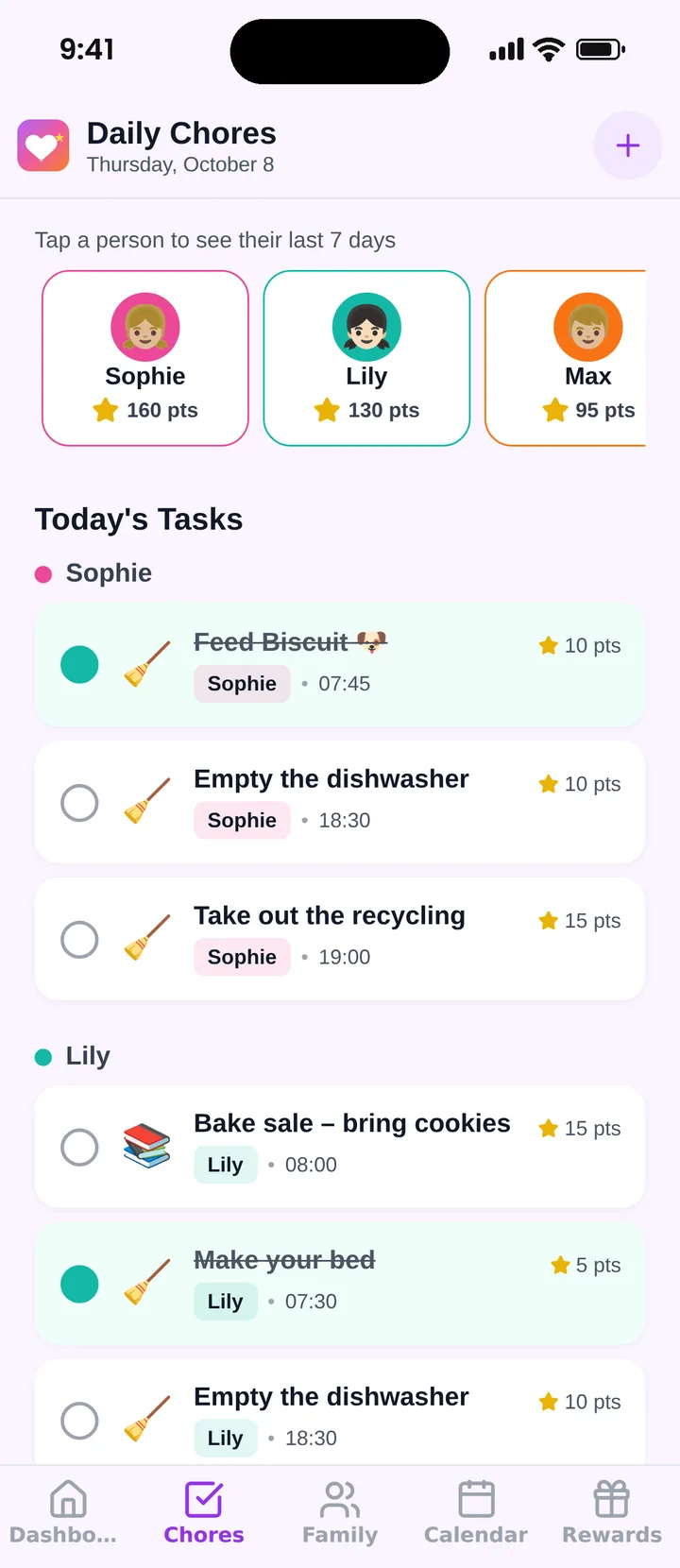
The free plan covers up to 3 family members and 1 repeating task, so try it with your usual week and see how it goes.
Frequently asked questions
Does Excel have a built-in chore chart template?
Microsoft offers a few chore chart templates in its template gallery, but they vary and often look busy. Building your own takes about 10 minutes: one column of tasks, seven day columns and a total row. A simple grid is easier for kids to read.
How do I add up points in an Excel chore chart?
Put a 1 in each day's cell when a chore is done, then in the total column use =SUM(B2:H2) times the point value in column I. For a weekly total, add the column with =SUM(J2:J9). Conditional formatting can turn finished cells green.
How many chores should go on a kids' chore chart?
Five to eight tasks fit one page comfortably. For younger kids, 2 to 3 daily tasks is plenty for preschoolers and 3 to 4 for school-age children. Add one bigger weekly job from age 8.
Should I print the chart or keep it on a screen?
Younger kids do better with paper on the fridge, because they can see it and tick it with a pen. Older kids and teens often prefer a phone. Pick the one the child will actually look at every day.
Try Famiyo With Your Family
Chores with points, a rewards shop for kids and one shared family calendar. Set it up in a couple of minutes.



Free to download • No credit card required • Available on iOS & Android