Teaching Kids About Money Management at Every Age
A practical guide to teaching kids money management: what to teach at ages 3 to 17, how spend-save-give works, and how to make tap-to-pay money feel real.
By Famiyo Editorial Team6 min read
Most of us learned about money by watching cash change hands. Your kids are growing up tapping a phone and watching a package arrive two days later, so the link between earning, spending and having less is a lot harder to see. This guide covers what to teach at each age, how to set up a system your child can actually learn from, and how to make digital money feel real.
Money lessons are habits, and the habits come first
Before you worry about interest rates or investing, aim for four habits: wait before buying, compare prices, set some money aside, and notice what a choice cost you. Those carry a child through adult money decisions. Facts like how a credit card works fit on top later, once the habits are there.
The simplest way to build those habits is to give your child a small amount of their own money to decide about, and then to keep quiet when they decide badly. A 7-year-old who buys a toy that breaks in a week has learned more than any lecture could teach. It cost a few dollars, and that is the cheapest tuition they will ever pay.
What to teach at each age
| Age | What to focus on | Something to try this week |
|---|---|---|
| 3 to 5 | Things cost money, you can't have everything, waiting | Let them hand over the money at the store and say "that costs $2" |
| 6 to 8 | Counting, saving for a goal, spend-save-give | Start a small weekly amount in three jars or three labeled lists |
| 9 to 11 | Needs versus wants, comparing prices, a simple budget | Give a set amount for one outing or a gift and let them plan it |
| 12 to 14 | Managing a longer period, cash versus digital, scams | Move to a monthly amount covering a few expenses |
| 15 to 17 | Real-world costs, earning outside the home, bank accounts, interest | Open a youth account with you and review it monthly |
You will not hit each point at the right age. Skip around and repeat. Children come back to the same lessons with new understanding at every stage.
Set up a money routine they can see
A regular amount at a regular time is the engine of all of this. The common rule of thumb is $1 per week for each year of age, so an 8-year-old would get $8. Typical weekly ranges run $3 to $7 at ages 5 to 7, $7 to $10 at ages 8 to 10, $10 to $15 at ages 11 to 13, and $15 to $25 from age 14. Treat those as a starting point and set it based on what your child is expected to cover.
For younger kids, divide every payment the same way. A simple version is 50% spend, 40% save and 10% give. On $6 a week that is $3 to spend, $2.40 to save and 60 cents to give. Use real jars or three labeled rows on a simple tracker. What matters is that your child watches the saving grow.
Two rules keep the system teaching and not just paying:
- Don't bail them out. If the money is spent, it is spent until next week. Be kind about it, but hold the line.
- Keep it predictable. Same amount, same day. A child can't plan with money that arrives at random.
Whether to tie that money to chores is its own debate. We walk through it in should kids get paid for chores, and the short version is to keep basic family jobs unpaid and pay for extra ones.
Make digital money visible
Cash is easy to understand: you hand it over and have less. A card or phone payment skips all of that. A few habits restore the feeling.
- Show the balance before and after. "You had $40. This costs $12. You'll have $28."
- Let them pay, even when it is your card. Then have them count out the same amount in cash, so the cost has a size they can see.
- Talk about in-app purchases and game currency directly. A bundle of gems is real money in a costume.
- Use a waiting rule for bigger buys. For anything over a set amount, wait 48 hours and see if they still want it.
- Compare prices out loud. Open two stores on one screen and ask which is cheaper and why.
Teens need a different set of lessons on top: how subscriptions renew, why a "free trial" asks for a card, how to spot a scam message, and what a fee costs over a year. These conversations go better when you ask questions than when you lecture.
Teach saving with a goal, not a rule
"Save your money" means little to a child. "Save for the Lego set" means a lot. Pick one thing your child truly wants, write the price on a card, and mark the weeks it will take. Say your 9-year-old gets $8 a week and puts 40% in savings, which is $3.20. A $32 set takes ten weeks. That is a long wait for a child, so break it into stages: a drawing of the set with ten boxes, one colored in each week.
Some families add a match on savings, such as 25 cents for every dollar saved. It shows why saving pays, and it is cheap compared with the lesson. Keep the match small and announced in advance, and drop it when the child has the habit.
Let them make small mistakes
It is hard to stand by while your child spends a month of saving on something flimsy. Do it anyway, within limits. A good guide is that the loss should be small enough that they can recover from it in a few weeks.
Afterward, ask rather than tell. "How do you feel about it now?" and "What would you do next time?" get a child thinking. A reminder of "I told you so" gets you a closed door.
Safety limits matter too. You can veto purchases that are unsafe, unsuitable or against family rules. Say so up front, so a veto isn't a surprise.
Bridge to real money with points
Some children are not ready for real money at all, or you want to practice the habits before real dollars are involved. Points work as a training currency. A child earns points for jobs, watches the balance, saves toward something bigger and sees what it costs to spend. The point-to-money conversion in our default is 100 points = $1, so the same lessons carry over. Our guide to the point system for kids explains how to set values.
The jump to real investing and compound interest comes later, once the saving habit is stable. See teaching kids about investing for that next step.
Practicing with a rewards shop in Famiyo
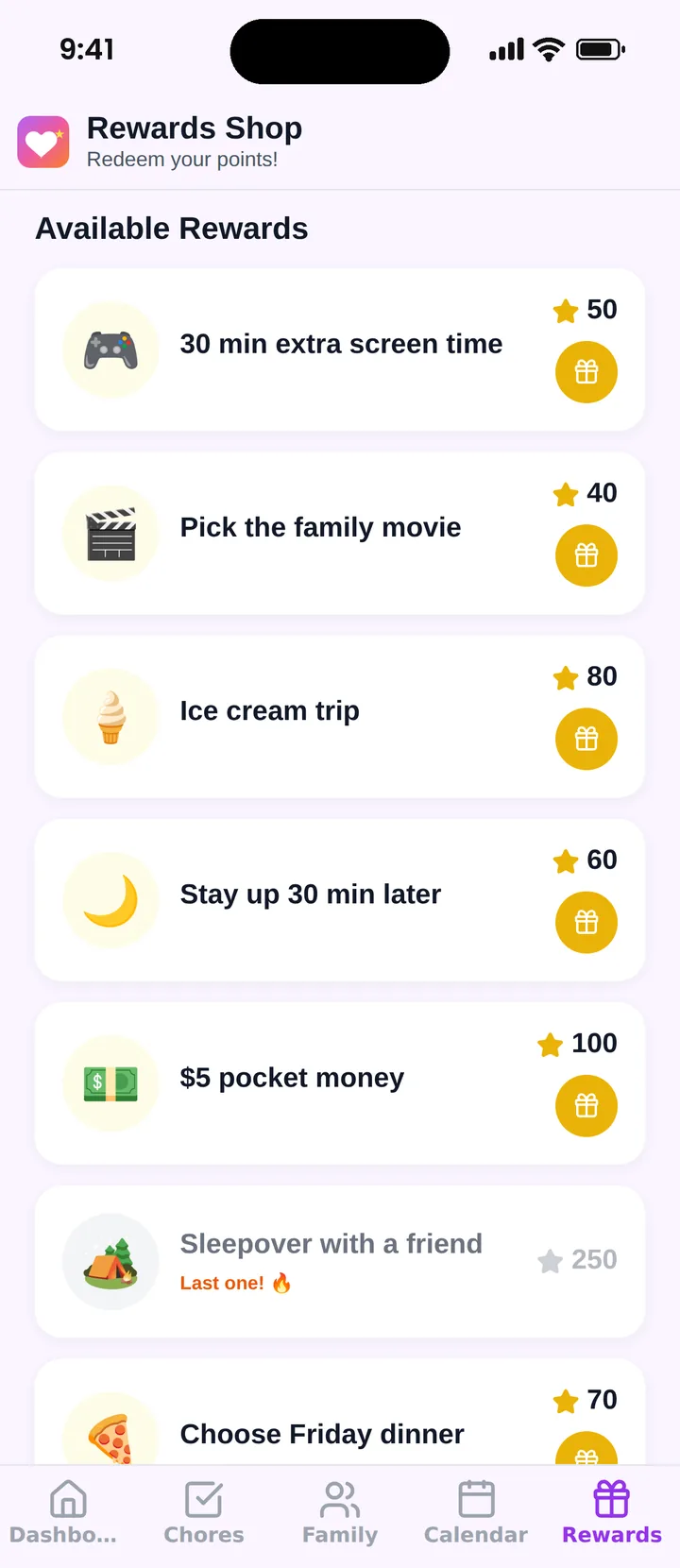
Famiyo is a free family app for iPhone and Android that combines a shared family calendar, chores with points and a rewards shop; kids join with a code, no email needed. In the rewards shop you create rewards with a price in points, how many are available and when. Pocket money can be one of those rewards, for example "$5 pocket money for 500 points", but the money itself changes hands outside the app, because Famiyo does not hold or move real money. Your child redeems from their own phone and sees how many points they will have left, which is the same before-and-after view that makes digital spending feel real. Our list of allowance apps for kids compares options.
Pick one habit from this page, probably the weekly amount and the three-way split, and run it for a month before adding anything else.
Frequently asked questions
At what age should I start teaching kids about money?
Around age 3 to 5, with simple ideas: things cost money, you wait to buy, and you can choose between two items. Real handling of coins and a small regular amount usually starts around 5 to 7, when children can count and understand saving.
What is the spend, save, give method?
Money is divided into three jars or accounts: spend now, save for something bigger, and give to others. A common split for younger kids is 50% spend, 40% save and 10% give. Adjust the numbers to what your child can learn from.
How much should I give kids as allowance?
A common rule of thumb is $1 a week for each year of age. Typical ranges are $3 to $7 at ages 5 to 7, $7 to $10 at 8 to 10, $10 to $15 at 11 to 13 and $15 to $25 from 14. It is a starting point, not a standard.
How do I teach kids about money when everything is digital?
Make the money visible. Show them the price, the balance before and after, and what the same amount buys in cash. Let them pay, even with your card, then count out what it cost. Points or a simple tracker can bridge the gap.
Try Famiyo With Your Family
Chores with points, a rewards shop for kids and one shared family calendar. Set it up in a couple of minutes.



Free to download • No credit card required • Available on iOS & Android